
 Admin
Admin
WhatsApp Channels have become an important way for creators, organizations, businesses, and public figures to share information with large audiences without turning their personal chats into busy discussion spaces. Introduced as a one-way broadcasting feature, Channels allow administrators to publish text, photos, videos, links, stickers, audio, and polls through WhatsApp’s Updates tab. Among the most useful engagement tools are emoji reactions and polls, which give followers simple ways to interact with published updates. The phrase The 2 WhatsApp Channel Features commonly refers to these two interaction options. Together, they make Channels more responsive while keeping the basic broadcast model intact.
What Are WhatsApp Channels?
WhatsApp Channels are designed for one-way communication between an administrator and an audience. Unlike a normal WhatsApp group, followers do not participate in an open conversation underneath every update. Instead, an administrator publishes information, while followers can interact through supported tools such as reactions and polls. Channels appear separately from personal conversations inside the Updates area, helping users keep broadcast information apart from private chats. WhatsApp says people can follow channels belonging to people and organizations they care about and receive updates containing text, links, photos, and videos. This structure makes Channels particularly useful for news, announcements, communities, entertainment, businesses, sports, and other recurring information.
Why The 2 WhatsApp Channel Features Matter
The main advantage of The 2 WhatsApp Channel Features is that they add interaction without changing Channels into traditional group chats. Emoji reactions provide an extremely quick response, while polls allow administrators to ask a question and collect structured feedback. This difference is important because audiences do not always have the time or desire to write a message. A single reaction can communicate approval or interest instantly, while a poll can gather opinions from many followers in a much more organized format. WhatsApp’s official documentation confirms that followers can show interest by adding emoji reactions or voting on polls.
Feature One: Emoji Reactions
The first of The 2 WhatsApp Channel Features is emoji reactions. Reactions provide a lightweight way for followers to respond to Channel updates without sending a direct message. Depending on the available reaction options, users can choose an emoji that represents how they feel about the content. WhatsApp also displays reaction totals, allowing administrators and followers to see the overall response to an update. Importantly, the reaction system is designed with privacy in mind. WhatsApp explains that other followers cannot see how an individual person reacted, although channel administrators may have access to certain profile information associated with interactions depending on privacy settings.
How Emoji Reactions Work
Using the reaction feature is straightforward. When a follower views an eligible Channel update, they can select an available emoji reaction. The reaction becomes associated with that particular update, and the overall reaction count can help indicate audience interest. For creators, this provides a quick signal about which subjects generate attention. For followers, it removes the need to compose a response simply to express approval, excitement, amusement, or another basic feeling. This simplicity is one reason The 2 WhatsApp Channel Features are valuable for engagement. Reactions require very little effort, making them suitable for audiences that may scroll through several updates in a short period.
Benefits of Emoji Reactions
Emoji reactions can provide several practical benefits to Channel administrators. First, they offer an immediate indication of how audiences respond to different subjects. If one update receives substantially more reactions than another, the administrator can use that information as one signal when planning future content. Reactions can also make a Channel feel less one-directional because followers have a simple method of showing interest. However, reactions should not be treated as a complete analytical system. A high reaction count does not necessarily explain why people liked something or what they want next. Instead, reactions work best as a quick engagement indicator alongside other Channel metrics and audience feedback.
Feature Two: Polls
The second of The 2 WhatsApp Channel Features is the poll. Polls allow Channel administrators to ask followers a question and provide selectable answers. Instead of relying only on reaction counts, polls can collect more specific information from an audience. For example, an administrator could ask which topic followers want to see next or which option they prefer from a set of choices. WhatsApp’s Channel documentation lists polls among the content formats available to Channel administrators and explains that followers can participate by voting. This makes polls especially useful when an administrator wants more structured feedback rather than a simple indication that people enjoyed an update.
How WhatsApp Channel Polls Work
A Channel poll works differently from a normal conversational message because the audience is responding within a broadcast environment. The administrator creates a question and supplies answer choices, after which followers can select an option. The resulting votes provide a clearer picture of audience preferences than a general reaction can. WhatsApp has also emphasized privacy around Channel interactions. People viewing a Channel cannot generally see another follower’s poll choices, name, phone number, or profile picture, although administrators may receive limited information about interactions depending on privacy settings. This approach allows polls to gather useful feedback without turning the Channel into a public discussion board.
Polls vs. Emoji Reactions
Although The 2 WhatsApp Channel Features serve related purposes, they are not interchangeable. Emoji reactions are best when an administrator wants a fast emotional or general response. A reaction can communicate that an update was appreciated without requiring a specific answer. Polls, on the other hand, are better when the administrator needs followers to choose between defined alternatives or provide a measurable preference. For example, a creator announcing several possible future topics might use a poll, while a simple celebratory announcement could invite reactions. Choosing between the two depends on the question being asked and the type of information the administrator wants to collect.
The Privacy Behind Channel Interactions
Privacy is an important part of understanding The 2 WhatsApp Channel Features. WhatsApp states that followers are not visible to other people viewing a Channel, and ordinary viewers cannot see who follows a Channel or how individual followers interact with its content. Their phone numbers, profile pictures, reactions, and poll votes are not publicly exposed to other followers. However, administrators can have access to certain follower information associated with interactions, depending on circumstances and privacy settings. Users should therefore understand that a Channel is different from a private chat. Channel updates are public, and WhatsApp specifically notes that Channel updates are not end-to-end encrypted.
Why Channels Are Different From Groups
The difference between Channels and WhatsApp Groups helps explain why The 2 WhatsApp Channel Features are useful. In a Group, members can generally participate in conversations, send messages, and respond to other participants. A Channel instead focuses on broadcasting information from administrators to followers. Followers do not normally reply directly to Channel updates or send messages to administrators through the Channel. Instead, reactions and polls provide controlled interaction. This arrangement can be particularly helpful for organizations that want to communicate with a large audience without creating a constant stream of unrelated replies.
Using Reactions for Content Strategy
Channel administrators can use emoji reactions as a simple part of their content strategy. For example, after sharing an announcement, an administrator can observe the general level of reaction and compare it with previous updates. Reactions can also help identify content that attracts attention quickly. The important point is to look for patterns rather than isolated numbers. One popular update does not necessarily prove that a particular content category will always perform well. Over time, however, repeated reaction patterns may provide useful clues about audience interests. Combining reaction activity with Channel growth and reach information can give administrators a more balanced understanding of performance.
Using Polls for Audience Feedback
Polls can make audience research more structured. Instead of asking followers to interpret an open-ended announcement, an administrator can present several clearly defined options. This may be useful for deciding future content topics, understanding preferences, or encouraging participation around a particular subject. Because voting is easier than composing a message, polls can potentially generate more responses from passive followers. WhatsApp Business documentation also confirms that businesses can use polls as part of their Channel content and view poll results alongside other engagement information. Administrators should nevertheless phrase questions clearly and avoid unnecessarily repetitive polls that could make a Channel feel cluttered.
Measuring Channel Engagement
The 2 WhatsApp Channel Features become even more useful when combined with Channel insights. WhatsApp says Channel administrators can access information concerning growth and reach, including accounts reached, top regions, and follows or unfollows over the previous 30 days. Business Channels can also see emoji reaction and poll results. These measurements help administrators understand more than follower totals alone. A Channel may have many followers but relatively limited interaction, while another may have a smaller audience that consistently responds to updates. Looking at multiple indicators gives administrators a more realistic picture of how their content is performing.
How Businesses Can Use These Features
Businesses can use The 2 WhatsApp Channel Features to make announcements more interactive while maintaining a broadcast-focused communication style. A company might use reactions after publishing an important announcement to gauge general audience interest, while a poll could ask followers which type of information they would prefer to receive. WhatsApp specifically describes Channels on its Business app as a way for businesses to broadcast updates to an audience of any size and lists text, images, videos, stickers, links, audio, and polls among supported content types. Businesses should keep questions relevant and avoid using interaction tools merely for the sake of generating activity.
How Creators Can Use The 2 WhatsApp Channel Features
Creators can also benefit from these tools by turning passive audiences into participants. Reactions are useful for quick feedback after publishing entertainment, educational, or informational content. Polls can be used when a creator wants followers to choose between subjects, formats, or upcoming ideas. The key is consistency: creators should ask questions that have a clear purpose and then pay attention to recurring patterns. The 2 WhatsApp Channel Features should complement good content rather than replace it. Strong information, useful updates, and an identifiable topic remain the foundation of a successful Channel, while reactions and polls provide additional ways to understand audience interest.
Finding and Following WhatsApp Channels
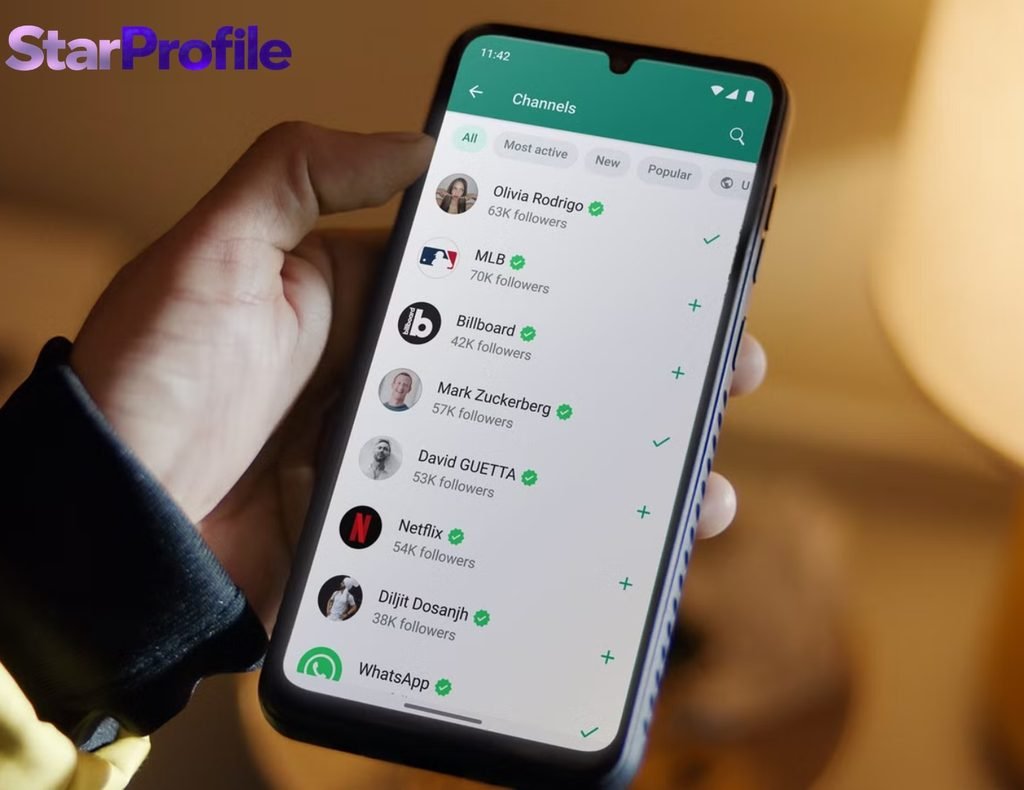
Users can discover Channels directly through the Channels area in WhatsApp. The platform allows people to search for channels, browse categories, and sort available channels using options such as new, popular, or most active. Users can also preview recent Channel updates before deciding whether to follow. WhatsApp notes that Channels carrying a verified badge have been verified as authentic. Once a user follows a Channel, its updates appear in the Channels area, and notifications can be enabled when desired. This discovery system makes the interaction features more useful because users can choose Channels based on their actual interests.
Important Limitations to Know
Despite the advantages of The 2 WhatsApp Channel Features, there are limitations. Channels are not ordinary private conversations, and their updates are public. WhatsApp states that people can see Channel updates from the previous 30 days, including people who do not follow the Channel. Channel updates also are not end-to-end encrypted. These details matter when administrators decide what to publish. Sensitive personal information should not be placed into a public Channel. Administrators are responsible for keeping their content safe, relevant, and appropriate for their followers. Understanding these boundaries helps users enjoy Channel interaction without confusing it with WhatsApp’s private messaging environment.
Are The 2 WhatsApp Channel Features Available Everywhere?
Feature availability can depend on the WhatsApp version, platform, account, and rollout stage. WhatsApp regularly introduces Channel capabilities gradually, meaning a particular function may not appear for every user simultaneously. Its Business Help Center specifically notes that Channel features can be rolled out gradually and that some capabilities may not yet be available to everyone. Therefore, users should keep WhatsApp updated and check the Channels area of their application when looking for new functionality. The exact interface can also differ between Android, iOS, Web, and other supported versions.
The Future of WhatsApp Channels
WhatsApp continues to expand Channels beyond basic broadcasting. The company has introduced additional ways for administrators and businesses to build audiences, including Channel subscriptions and promoted Channels as part of its broader development of the Updates experience. Voice updates are another supported Channel format, and WhatsApp provides playback tools such as speed controls and a mini-player. These developments suggest that Channels are becoming a broader publishing platform inside WhatsApp. Even as new features arrive, reactions and polls remain important because they provide simple ways for audiences to respond without abandoning the broadcast structure.
Conclusion
The 2 WhatsApp Channel Features—emoji reactions and polls—make WhatsApp Channels more interactive without turning them into conventional group chats. Reactions provide quick, low-effort feedback, while polls give administrators a more structured way to understand audience preferences. Both features operate within WhatsApp’s Channel privacy model, where followers are not publicly exposed to one another, although administrators may receive limited interaction information under applicable settings. For businesses, creators, organizations, and other Channel administrators, the most effective approach is to use these tools purposefully alongside useful content and Channel insights. As WhatsApp continues developing Channels, The 2 WhatsApp Channel Features remain practical tools for measuring interest and encouraging meaningful audience participation.
FAQs About The 2 WhatsApp Channel Features
1. What are The 2 WhatsApp Channel Features?
The 2 WhatsApp Channel Features discussed in this article are emoji reactions and polls. Reactions provide quick feedback on Channel updates, while polls allow followers to select from administrator-provided choices.
2. Can WhatsApp Channel followers reply directly?
Generally, Channels use a one-way broadcast model, so followers cannot reply directly to ordinary Channel updates or start a normal conversation with the administrator through the update. Instead, WhatsApp provides interaction options such as reactions and polls.
3. Can other followers see my reaction or poll vote?
WhatsApp states that other people viewing a Channel cannot see your name, phone number, profile picture, reactions, or poll votes. However, Channel administrators may have access to certain profile or interaction information depending on privacy settings.
4. Are WhatsApp Channel updates private?
No. Channel updates are considered public content, and WhatsApp states that Channel updates are not end-to-end encrypted. Users should avoid posting sensitive personal information in Channels.
5. Can businesses use WhatsApp Channel polls?
Yes. WhatsApp Business Channels support polls along with other formats including text, images, videos, stickers, links, and audio. Businesses can also access engagement information such as poll results and emoji reactions.
6. Which is better: reactions or polls?
Neither is universally better. Reactions are best for quick general feedback, while polls are better when you need followers to choose between specific options. Using both appropriately can provide a broader understanding of audience engagement.
7. Are all WhatsApp Channel features available to everyone?
Not necessarily. WhatsApp says Channel capabilities can be rolled out gradually, so some features may not be available to every account or platform at the same time.



[…] fact: traditional tailoring is enjoying a fresh revival. After years of increasingly casual clothing, structured menswear is once again attracting attention, but the modern interpretation is more […]